
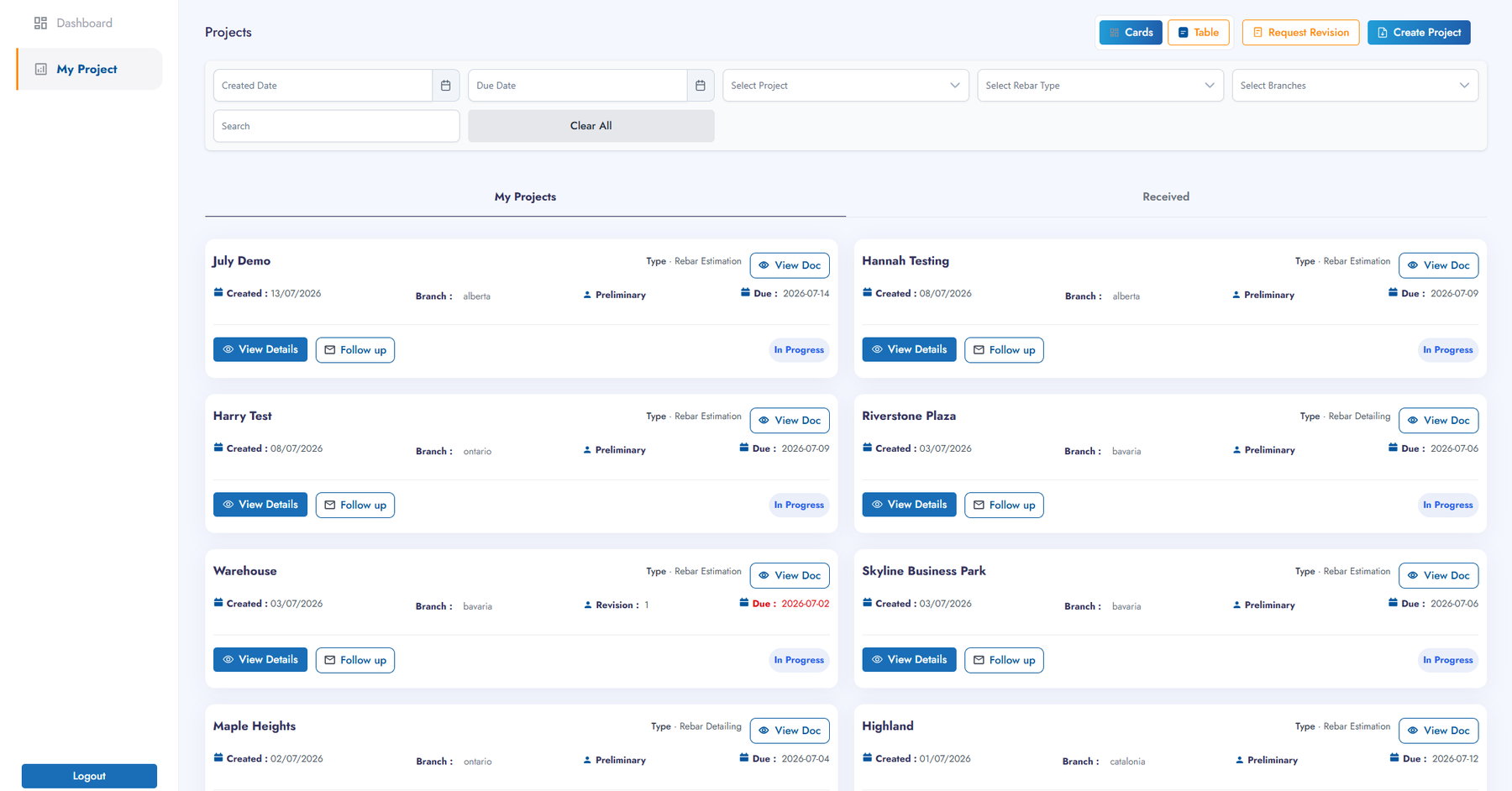
Every Bar, Every Drawing, Every Stage — Tracked.
Vendor Management connects customers, project managers, and designers on one workflow for rebar estimation, detailing, fabrication, formwork and shoring — so nothing moves without a record.
Everyone Works From the Same Record
Each role gets a purpose-built view of the same underlying workflow — nothing is re-keyed between teams.
Customer
Submit requests, track stages, and request revisions.
Project Manager
Assign designers, monitor SLA performance, and review submissions.
Designer
Work a prioritized queue with time registration and peer-review routing.
A Record at Every Stage
Request
Assign
Execute
Peer Review
Submit
PM Review
Deliver
Every stage is timestamped, giving full traceability from first request to final delivery.
One Lifecycle, Five Stations
Purpose-built for structural steel work — each module maps onto a distinct stage of the civil detailing lifecycle.
Rebar Estimation
Preliminary quantity take-off and tonnage estimation from customer-supplied drawings.
Inputs: Customer drawings, reference links, project scope, region and branch.
Outputs: Preliminary tonnage, estimation report, percentage-complete tracking.
Rebar Detailing
Converts approved estimation — or direct customer input — into detailed shop drawings and bar bending schedules ready for fabrication.
Inputs: Approved estimation, customer/contractor specifications, required stock length.
Outputs: Detailed drawings, bar bending schedules, final tonnage and sheet counts.
Rebar Fabrication
Extends approved detailing output into fabrication-ready instructions, closing the loop between design intent and shop-floor execution.
Inputs: Approved bar bending schedules and detailing drawings.
Outputs: Fabrication instructions and contractor-ready documentation.
Formwork
Supports formwork planning and coordination in parallel with rebar workflows, so reinforcement and formwork designs stay aligned.
Inputs: Structural drawings and rebar schedule milestones.
Outputs: Formwork plans coordinated with the reinforcement timeline.
Shoring
Supports temporary shoring design and removal sequencing, ensuring structural stability while permanent elements cure.
Inputs: Structural loading data and construction sequencing.
Outputs: Shoring design and a removal sequencing plan.
Built for Accountability at Every Handoff
Role-Based Dashboards
KPI tiles tailored to each role.
Status-Driven Task Management
Six states with built-in time controls.
Mandatory Peer Review Gate
Only reviewed work moves forward.
In-App Notifications
Stay current without checking in manually.
Branch & Region Analytics
Compare performance across locations.
Vendor / Designer Assignment Tracking
See workload and availability at a glance.
SLA Monitoring
Catch at-risk work before it's late.
Document Management With Audit Trails
Every file and revision is traceable.
Data Captured Automatically, Not Compiled by Hand
Reporting data is captured automatically at every stage and aggregated into role-specific dashboards — no manual spreadsheet compilation required.
Five Reasons Detailing Teams Move to Vendor Management
Transparency
Every stakeholder sees the same live status — no waiting on a status email.
Speed
Structured handoffs remove the back-and-forth that stalls detailing work.
Quality
The mandatory peer-review gate catches issues before they reach fabrication.
Accountability
Every action is timestamped and attributed.
Collaboration
Customers, PMs, and designers work from one shared record instead of side channels.
Frequently Asked Questions
Does Vendor Management integrate with our existing software?
Vendor Management is built to sit alongside your existing drawing and document tools, connecting the workflow and reporting layer without replacing your CAD or detailing software.
What happens if a customer needs a revision after delivery?
Revisions re-enter the pipeline at the appropriate stage and are tracked separately from the original submission, so revision rate stays visible in reporting.
How does the peer review step work?
Before a submission reaches PM review, it's routed to a peer designer for a structured quality check — only reviewed work can move forward.
Can Vendor Management support multiple branches or regions?
Yes. Branch and region analytics let you compare performance and workload across locations from one platform.
What does the designer experience look like?
Designers work from a prioritized queue with built-in time registration, so workload and turnaround are visible without manual timesheets.
Ready to See a Module in Your Own Data?
Bring one active project. We'll walk through exactly how Vendor Management tracks it from request to delivery.